How to unrepost on TikTok? How to remove a repost on TikTok? If you’re having trouble removing a repost, follow the step-by-step instructions in this guide from https://howfinitytech.com/ to successfully undo your repost.

How to Unrepost on TikTok
Have you reposted a TikTok video and want to undo it immediately? Unfortunately, this feature is not currently available. TikTok does not have an undo repost feature; it only allows you to remove reposted videos. You can either remove each repost manually or use a third-party app to remove them all at once.
» Click more: What is going on with TikTok search?
How to Remove Reposts on TikTok in Different Situations
Have you reposted a TikTok video and want to undo it immediately? Unfortunately, TikTok does not currently offer a feature to remove all reposts at once directly within the app. However, you can remove individual reposts manually or use third-party apps to manage multiple reposts.
In this guide, you will learn , how to remove all reposts at once, what to do when TikTok won’t let you remove a repost, and how to undo a repost of a TikTok LIVE.
1. How to Remove a Repost on TikTok Manually
You can manually remove individual TikTok reposts by following these simple steps:
Step 1: Open TikTok and find the video you have reposted.
Step 2: Tap the Share arrow on the right side of the screen.

Step 3: Select Remove repost from the menu. Depending on your app version, this option may appear with a yellow or mustard-colored repost icon.

Step 4: Once you tap Remove repost, your repost will be undone.

This method allows you to remove one repost at a time. If you have reposted many videos, you will need to repeat these steps for each video.
» WHY: When I follow someone on TikTok it automatically unfollows
2. How to Unrepost on TikTok All at Once
TikTok does not officially support removing all reposts in bulk. If you want to clear your repost history, you generally have two options: remove each repost manually or explore third-party tools.
Some third-party apps and services that you may come across include:
- Repost Remover – EraseTok
- The UnRepostAll app
These tools may offer features for managing or removing multiple reposts, depending on their current availability and compatibility with TikTok.
Important note: Third-party apps may charge a fee, and TikTok does not officially endorse these tools. Before using one, check its permissions, privacy policy, reviews, and security practices. Avoid sharing your TikTok password with an untrusted service, and remember that using third-party tools may carry account security risks.
3. How to Remove a Repost on TikTok When It Won’t Let You
Sometimes, TikTok may not let you remove a repost because of a temporary app error, a poor internet connection, or a problem with the app’s cache.
If you cannot remove a repost, try the following troubleshooting methods:
Step 1: Check your internet connection.
Switch between Wi-Fi and mobile data to see whether the problem is related to your connection.
Step 2: Clear the TikTok cache.
1. Open TikTok and go to your Profile.
2. Tap the menu icon in the upper-right corner.
3. Select Settings and privacy.

4. Find Free up space or the cache-clearing option.
5. Tap Clear next to Cache.

The exact menu names may vary depending on your TikTok version.
Step 3: Restart TikTok.
Close the app completely and reopen it. Then, find the reposted video and try removing the repost again.
Step 4: Update TikTok.
Check the Google Play Store or Apple App Store for available updates and install the latest version.
Step 5: Reinstall TikTok if necessary.
If the problem persists, uninstall and reinstall the app. Make sure you know your login details before doing so, and be aware that uninstalling TikTok may remove locally stored drafts.
If none of these methods works, the issue may be temporary. Wait a while and try again.
4. How to Unrepost a LIVE on TikTok
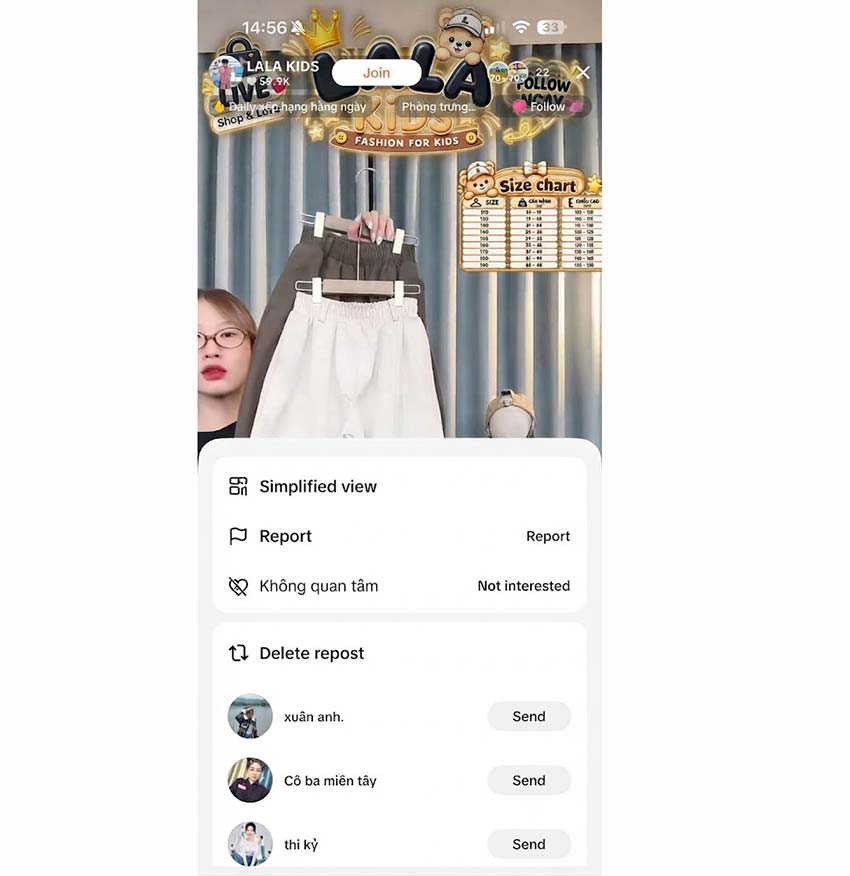
TikTok LIVE videos won’t appear in your Repost tab when you repost them. So, if you want to undo a repost on TikTok, there’s only one way: revisit the LIVE video, press and hold the screen, and select “Remove repost” from the menu. That’s it! You’ve successfully removed the repost, so there’s no need to worry if you accidentally reposted a LIVE video.
Frequently Asked Questions
Does Removing a TikTok Repost Delete the Original Video?
No. Removing a repost does not delete the original video uploaded by its creator. It only removes your repost and its association with your account.
The original video can remain available on TikTok unless its creator deletes it, changes its availability, or TikTok removes it.
Can Other People See a TikTok Repost After You Remove It?
No, other people can no longer see the repost on your profile once you remove it. However, the original video remains available on the creator’s account, so they can still watch it there.
Will someone be notified if I remove a repost?
No, TikTok does not notify anyone when you remove a repost. They will only notice it if they visit your profile and can no longer see the reposted video.
Conclusion
Now you know how to unrepost on TikTok and how to remove reposts in different situations. You can manually remove individual reposts, troubleshoot issues when TikTok will not let you undo a repost, or explore third-party tools if you need bulk removal.
For the best account security, use TikTok’s built-in Remove repost feature whenever possible. We hope this guide helps you manage your TikTok reposts successfully!